Imagine you run a WooCommerce store.
A customer places an order. Then someone has to check the payment, create an invoice, send an email, update the CRM, and notify the delivery team.
Doing this once is easy.
Doing it 50 times every day is repetitive.
This is where automation can help.
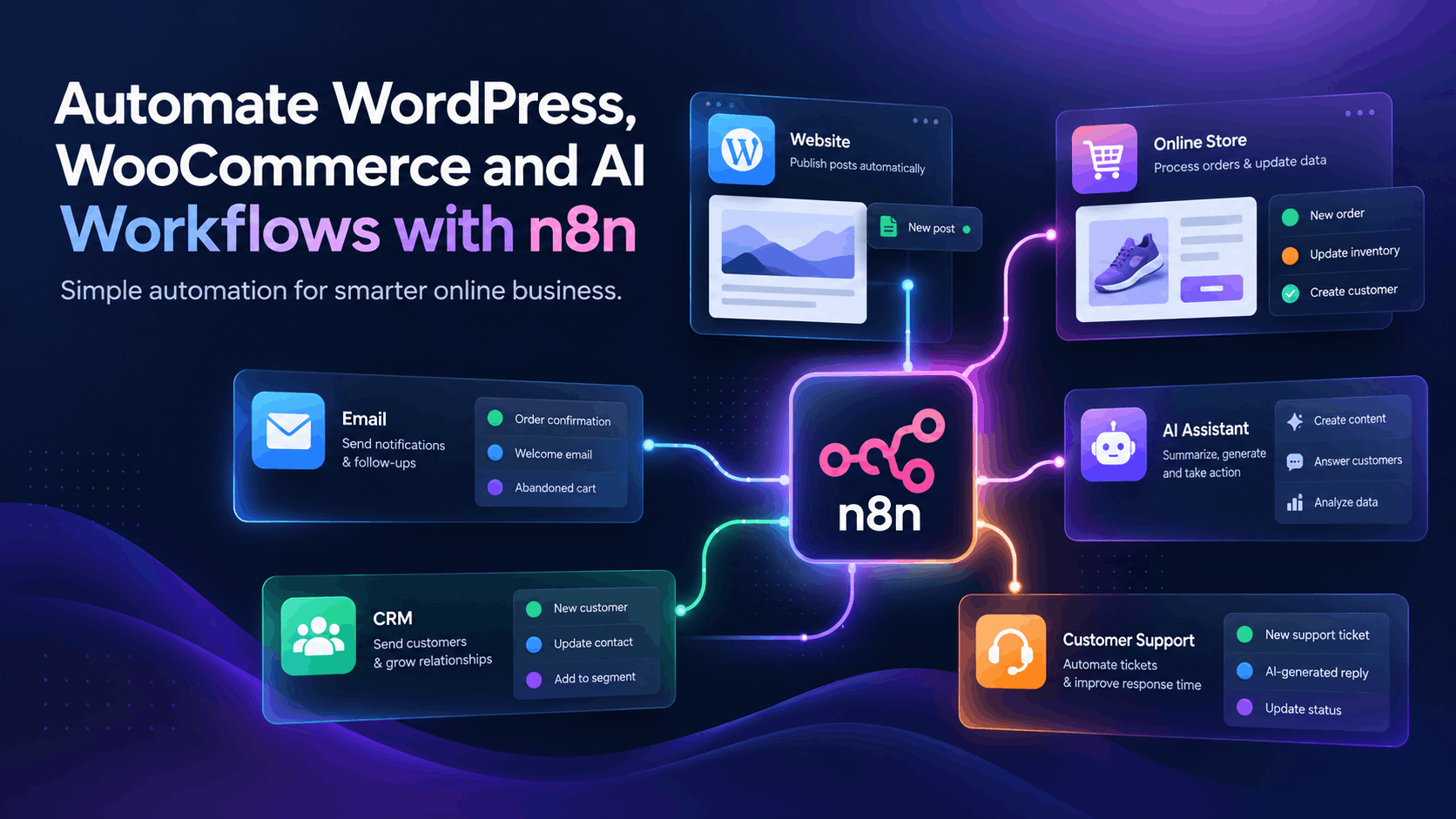
One tool that can help you build these automated processes is n8n.
What is n8n?
In simple words:
n8n is a tool that connects different apps and makes them work together automatically.
For example:
New WooCommerce order
↓
Check payment
↓
Create invoice
↓
Send customer email
↓
Notify your team
Instead of someone manually doing each step, n8n can perform the process automatically.
Think of n8n as a digital assistant. You give it instructions about what should happen, and it follows those instructions whenever the required event occurs.
What is a Workflow?
A workflow is simply a series of steps that happen in a particular order.
You already use workflows in everyday life.
For example, when ordering food:
Choose food → Place order → Kitchen prepares it → Food is delivered → Payment
n8n works in a similar way.
For a website:
Customer submits form → Save customer → Send email → Notify sales team
Each step can be represented by a node in n8n.
Think of nodes like LEGO blocks. You connect different blocks to build your automation.
The 3 Basic Parts of n8n
1. Trigger
A trigger tells n8n:
“Start the workflow now.”
Examples:
- A new WooCommerce order
- A WordPress form submission
- A new email
- A scheduled time
- A webhook
2. Action
An action tells n8n what to do.
For example:
- Send an email
- Add information to Google Sheets
- Create a CRM contact
- Send a Telegram notification
- Ask an AI model to summarize text
3. Logic
Sometimes different situations need different actions.
For example:
New order → Check payment
If payment is successful:
Create invoice → Send to delivery
If payment fails:
Notify store manager
This is conditional logic: if this happens, do that.
Example 1: Automating a WooCommerce Order
Suppose a customer buys a product from your WooCommerce store.
Normally, your team may need to check the order, confirm payment, create an invoice, send an email, and notify the delivery team.
With n8n, you could create:
New WooCommerce Order
↓
Check Payment Status
↓
Payment successful?
↓
YES → Create invoice → Send confirmation → Notify delivery team
NO → Notify store manager
This can save your team from repeating the same work for every order.
Example 2: WordPress Contact Form → CRM
Imagine your WordPress website has a contact form.
A visitor submits:
Name: Rahim
Business: Rahim Fashion
Requirement: I need a WooCommerce website.
Instead of manually copying this information into your CRM, n8n can do it automatically.
Contact Form Submitted
↓
Read customer information
↓
Create CRM Lead
↓
Send thank-you email
↓
Notify sales team
You could also add a condition.
For example:
If the message is about WooCommerce, assign the lead to the e-commerce specialist.
Example 3: AI-Powered Customer Support
This is where n8n becomes even more interesting.
Imagine a customer sends:
“I installed your plugin, but the checkout button isn’t working. My store is launching tomorrow.”
n8n can send this message to an AI model.
The AI could identify:
Product: WordPress Plugin
Issue: Checkout problem
Priority: High
Then n8n could:
Customer email
↓
AI analyzes message
↓
Create support ticket
↓
Notify support team
↓
Generate suggested reply
↓
Human reviews reply
↓
Send response
The important part is that AI does not have to make the final decision.
A human can review the answer before it reaches the customer.
Example 4: WordPress Content Automation
Suppose you publish an article on your WordPress website.
After publishing, you normally need to create social media content manually.
n8n can help.
New WordPress Post
↓
Get article content
↓
AI summarizes article
↓
Create LinkedIn draft
↓
Create Facebook draft
↓
Save drafts
Instead of creating everything from zero, you receive drafts that you can review and edit.
What are APIs and Webhooks?
You will often hear these words when learning n8n.
An API allows different software applications to communicate.
For example:
n8n → asks WooCommerce for order information → WooCommerce sends the data back.
A webhook allows one system to send information to another when something happens.
For example:
Customer submits form → Form sends information to n8n → Workflow starts.
You don’t need to understand everything about APIs and webhooks on day one, but learning these concepts will help you build more advanced workflows.
Can You Use n8n Without Coding?
Yes.
You can start with the visual workflow builder without being a professional programmer.
But learning some technical concepts will make you much more capable.
Useful skills include:
- WordPress
- REST APIs
- JSON
- Webhooks
- HTTP requests
- JavaScript
- Databases
You don’t need to learn everything before starting.
Build simple workflows first and learn new concepts as you need them.
n8n + AI: Why Is This Powerful?
Traditional automation is good at following fixed instructions:
“When an order arrives, send an email.”
AI is useful when information needs to be understood.
For example:
“Read this customer message and determine what problem they are reporting.”
n8n can connect the two.
Customer message → AI understands it → n8n applies business rules → Human reviews → Final action
This makes it possible to build smarter workflows without creating a complete software application from scratch.
What Can You Automate?
Here are some practical ideas for WordPress and e-commerce:
- WooCommerce order processing
- Lead collection
- CRM updates
- Customer support
- Invoice workflows
- Email notifications
- Content creation
- Customer feedback analysis
- Website monitoring
- Daily business reports
- AI-powered internal tools
You can connect n8n with many services, including WordPress, WooCommerce, Google Sheets, Gmail, Telegram, Slack, databases, APIs, and AI services.
How Should a Beginner Start?
Don’t try to automate your entire business on day one.
Start with something small.
Project 1
Schedule → Send yourself a daily message
Project 2
Form → Google Sheets
Project 3
New order → Team notification
Project 4
Customer message → AI summary → Spreadsheet
Project 5
WooCommerce order → Invoice → Email → Notification
Once you understand these simple workflows, you can gradually build more advanced systems.
Final Thoughts
n8n is essentially a visual way to tell different software systems:
“When this happens, do these things for me.”
For a WooCommerce store:
New order → Check payment → Invoice → Email → Delivery notification
For customer support:
New message → AI analysis → Ticket → Suggested reply → Human review
For WordPress content:
New article → AI summary → Social media drafts
The goal isn’t to automate everything.
The goal is to remove repetitive work so people can spend more time on work that actually needs human thinking.
If you work with WordPress, WooCommerce, customer support, content, or AI, n8n is worth exploring.
Start with one boring, repetitive task.
Automate it.
Then find the next one.
That’s the easiest way to understand the real value of n8n.